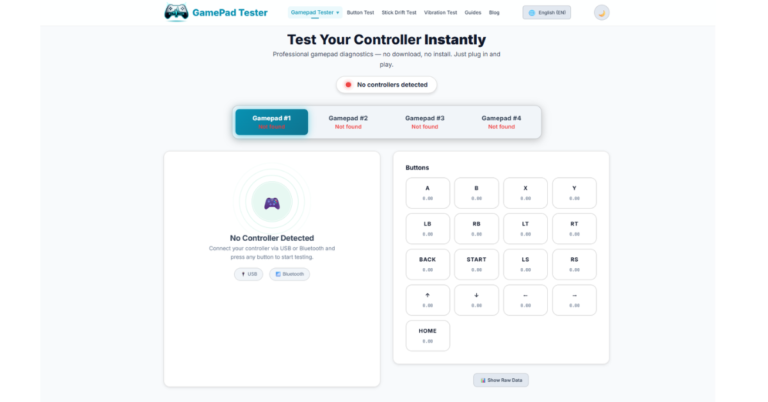
If your controller is not working properly in games, the first step is to test whether the buttons, triggers, and joysticks are functioning correctly. Instead of installing software, you can now test your controller directly in your browser using https://gpadtester.org/.
GPadTester is a free online gamepad tester that lets you check your controller inputs in real time. It works with Xbox controllers, PlayStation controllers, and many other USB or Bluetooth gamepads.
This simple web tool uses the Gamepad API supported by modern browsers, allowing instant detection of connected controllers.
What is an Online Gamepad Tester?
GPad Tester is an online controller testing tool built using the browser Gamepad API. It detects your connected gamepad and displays its input data instantly.
This makes it easy to verify whether your controller hardware is functioning correctly before using it in games or applications.
Key Features of GPad Tester and Tests Available
GPadTester provides several tests to help you fully diagnose your controller.
Button Test
Check whether all controller buttons are working properly. When you press a button, the tool highlights it instantly on screen.
Analog Stick Test
Move the left and right joysticks to verify their movement and accuracy. The tester shows the exact axis position and helps detect stick drift issues.
Trigger Test
Test the analog triggers (such as LT and RT). The tool displays how much pressure is applied when pressing the triggers.
D-Pad Test
Verify the directional pad inputs including up, down, left, and right directions.
Axis Movement Test
The tester monitors the controller axes and displays their values in real time. This is helpful for debugging controller input in games or applications.
Controller Detection Test
GPadTester automatically detects when a controller is connected and shows the device information.
Vibration / Haptic Support Check
For supported controllers, you can verify whether vibration or haptic feedback features are available.
Real-Time Input Monitoring
All controller inputs are displayed instantly, making it easy to see exactly how your controller is responding.
Because everything runs online, you only need to open the website and start testing.
Multi-Language Support
The website is available in multiple languages, allowing users from different regions to test their controllers in their preferred language.
How to Test Your Controller
Testing a controller using GPadTester only takes a few seconds.
- Connect your controller to your computer.
- Visit https://gpadtester.org/
- Press any button on the controller.
- The tool will show button presses and joystick movement instantly.
This helps confirm whether your controller hardware is working correctly.
Why Use an Online Gamepad Tester?
Controller issues are common when gaming on PC. Some typical problems include:
- Buttons not responding
- Analog stick drift
- Triggers not registering
- Controller not detected in games
By using GPad Tester you can quickly identify whether the issue is with the controller hardware or the game configuration.
Compatible Controllers
The tool supports many types of controllers, including:
- Xbox controllers
- PlayStation controllers
- Third-party USB controllers
- Bluetooth gamepads
As long as your browser supports the Gamepad API, the controller should be detected.
If you want to quickly verify your controller inputs, you can use the tool here: It is one of the simplest ways to test a controller online without downloading any software.